How does this look?
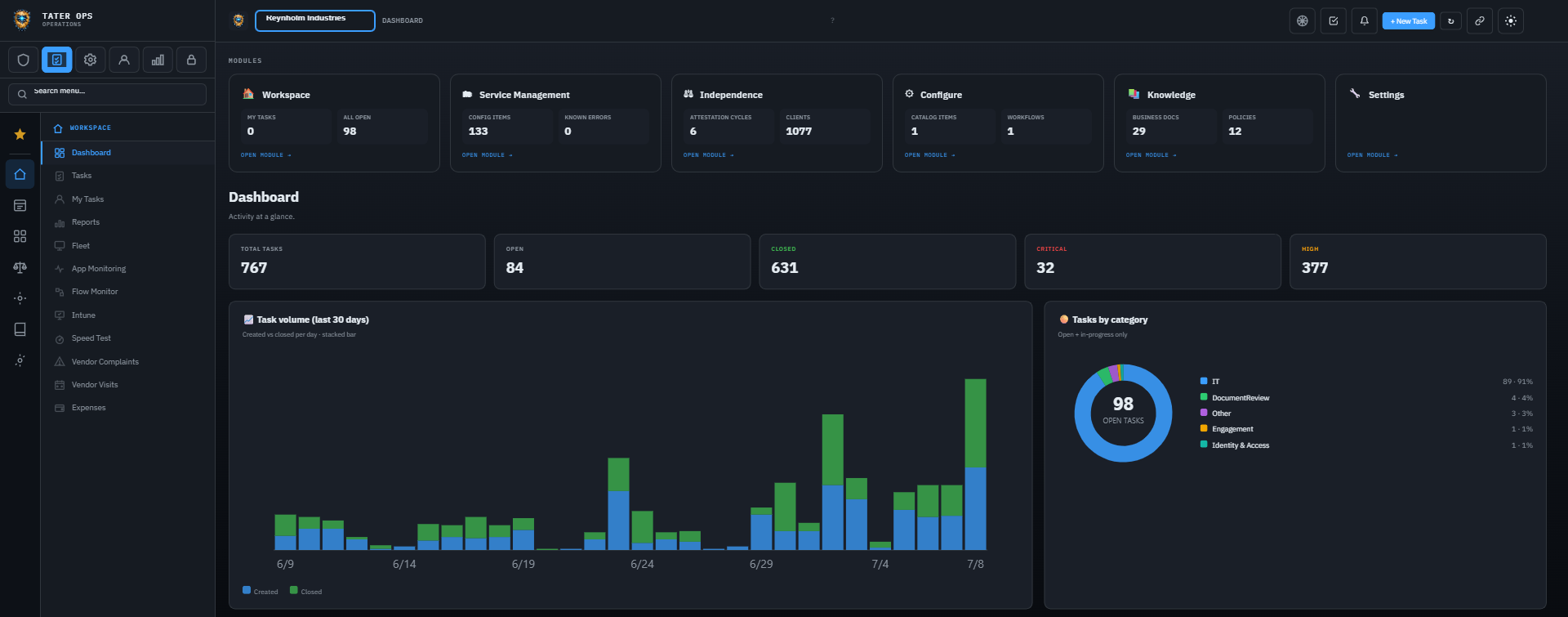
The Ops workspace — live task volume, categories, and every department’s queue in one place.
One service desk for every department that takes requests and fulfills them. IT gets the helpdesk, engineering gets the DevOps board, HR gets onboarding, finance gets AR & AP. Each team sets its own categories and SLAs behind the same sign-on.
The Ops workspace — live task volume, categories, and every department’s queue in one place.
Everything TATER Ops does, in one scan — drill into any area for the full detail.
Multi-channel intake (email, portal, API, Teams), smart routing, SLA tracking, and a unified queue.
Explore →Projects → milestones → tasks with a Planned (parked) state & activation dates for future phases, sprint mode, staff capacity, portfolio, workload & RAID log.
Explore →One trigger spawns a coordinated set of dependent tasks across teams, with sequential gates & escalation.
Explore →Incident, Request, Problem & NIST 800-61 IR profiles — per-type fields, status flows & SLAs.
Explore →16 CI types, typed relationships, blast-radius analysis, auto-discovery, and live business-service health.
Explore →Standard / Normal / Emergency changes, a voting CAB with a personal “Awaiting your CAB vote” queue, conflict detection, a change calendar & Release Management with a “Mine only” view of the releases you own.
Explore →Bridge, incident commander, subscriber broadcasts, post-incident review, plus Problem/KEDB & on-call rotations — and a public Status Page so people can see what is happening without opening a ticket to ask.
Explore →Meeting capture with AI-drafted actions, plus custom surveys & automatic post-ticket CSAT with computed NPS.
Explore →TATERpedia wiki + documentation with ratings and suggested articles, so common fixes deflect tickets.
Explore →Employees request SharePoint sites, shared mailboxes, DLs, or custom resources from My TATER; approved requests spawn tracked fulfillment tasks — guided steps or an automation script.
Explore →Formally request typed fields & documents — new-hire details, vendor security docs, audit evidence. Staff answer from My TATER; outside parties get a secure tokenized link, no login needed. Reusable templates track it all to completion.
Explore →For accounting & audit practices: an attest-client roster, annual and monthly-delta attestation cycles, per-employee sign-off, conflicts recorded against the person and the client, and engagement reviews aligned to AICPA & PCAOB.
Explore →When someone hands in their notice, open a case and TATER watches the mailbox — metadata only, never message content. Sender and recipient domains, volume, attachment counts and timing roll up into a daily briefing to the reviewers you name. Access is bound by a Microsoft 365 application access policy scoped to the case, so the collector can only ever see the one mailbox it was authorized for, and every case needs a human authorization on the record.
Explore →Agent-run network speed tests with per-device history, so “the internet is slow” becomes a chart instead of an argument. Endpoint Profiles group devices by role and apply the right hardening and patch posture to each.
Explore →Uptime and response monitoring for the applications your business actually runs on, plus a Power Automate Flow Monitor that catches the silent failure mode nobody watches for — a flow that has quietly stopped running. Failures raise a task, not just a dashboard tile.
Explore →Log a complaint against a vendor and track it to resolution, so the pattern is on the record at renewal time instead of in somebody’s memory. On-site vendor reviews capture findings against the vendor record the same way.
Explore →Expense requests with a named approver, receipt capture and a paid-status trail. Opportunities track the work in your pipeline alongside the work already committed, so capacity planning sees both.
Explore →Pick a process profile when you create a task and the form shows only the fields that standard requires — nothing more. Five profiles ship ready to use, from ITIL Incident to security incident response, with SLA targets computed automatically. Work differently? Build your own. See all five profiles →
The TATER agent records system audio and your mic, transcribes it entirely on-device with a local Whisper model — no cloud, no audio upload — then logs a calendar-matched Meeting Record your AI turns into action items over MCP. You review every transcript before anything is saved. See how it works →
If your team takes requests and tracks fulfillment, TATER Ops fits. Each department customizes its own categories, statuses, priorities, SLAs, and templates - without forking the platform or paying for separate modules.
The classic helpdesk surface - request intake, triage, assignment, conversation thread, and closure with resolution notes.
Native two-way sync with Azure DevOps work items. Tasks created in Ops appear as ADO work items; ADO state changes flow back to Ops automatically.
Multi-step onboarding parents with child tasks for IT setup, badge issuance, equipment, training assignment, and policy acknowledgment.
Approval routing with full conversation history and document attachments. Audit-ready trail for every invoice processed.
Office moves, vendor contract renewals, facility tickets, marketing requests - anything that's "someone needs something done by someone else by a date."
Built-in MSP relationship model. Service providers can hold one Ops account and access tasks across all their client orgs with tier-based permissions.
Every department has its own taxonomy - IT calls them "tickets", AR/AP calls them "invoices in flight", DevOps calls them "work items." TATER Ops lets each org configure its own categories, statuses, priorities, SLAs, and assignment teams. No engineering tickets, no platform team gatekeeping, no per-module pricing.
Concrete walkthroughs of how each department uses the same primitives differently.
Side-by-side with the platforms that built this category. Per-license, per-module, per-add-on costs add up - TATER Ops includes everything.
| Capability | TATER Ops | ServiceNow ITSM | Jira Service Mgmt | Freshservice | Zendesk |
|---|---|---|---|---|---|
| IT helpdesk | ● | ● | ● | ● | ● |
| HR / AR / AP / Operations on same platform | ● | Add-on modules | Limited | Add-on | ○ |
| Custom categories per org (no admin gatekeeping) | ● | Admin only | Project admin | ● | ● |
| SLA per category | ● | ● | ● | ● | ● |
| ITIL 4 / NIST 800-61 process templates (pre-seeded) | ● | Process app (add-on) | Templates only | Partial | ○ |
| Per-process field-visibility templating | ● | Form designer | Request types | Forms | ○ |
| Bidirectional Azure DevOps sync (built-in) | ● | Plugin | ● | Plugin | ○ |
| MCP / AI agent integration | ● | Now Assist (extra) | Atlassian Intelligence | Freddy AI (extra) | Zendesk AI (extra) |
| Microsoft 365 Copilot integration | ● | ○ | ○ | ○ | ○ |
| Multi-tenant (MSP-friendly) | ● | SP edition | ○ | MSP edition | ○ |
| Cross-link to compliance / risk / audit records | ● | GRC module | ○ | ○ | ○ |
| Power BI native dataset | ● | Performance Analytics | Limited | Limited | Limited |
| Per-module pricing | No | Yes | Yes | Yes | Yes |
| Implementation services required | No | Typically yes | Optional | Optional | Optional |
● = included · ○ = not available · Comparisons reflect base editions as of 2026. See full market comparison.
Optional cross-link to TATER Security: tickets can reference compliance controls, audits, change requests, vendors, or policies by ID. Both products show the link. Run TATER Ops standalone if you don't need the compliance side - it's a complete service desk on its own.
One platform for IT, DevOps, HR, finance ops, and any other request-driven workflow. No per-module licensing. No long implementation. Sign in with Microsoft and start in minutes.